
A Picture Frame That Starts Conversations on Video Calls
Contents
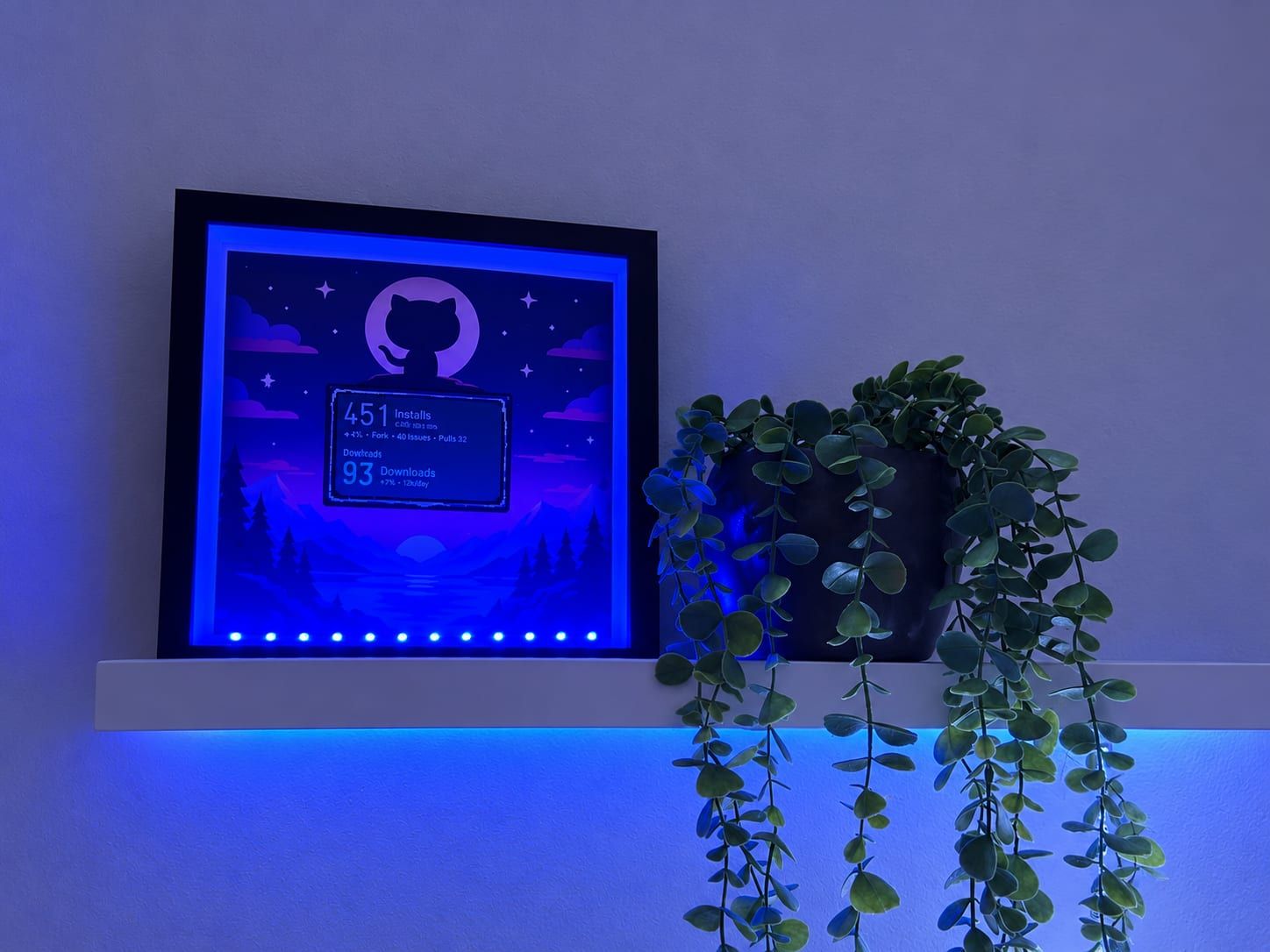
There's a new picture frame on the shelf behind me in my home office. At first glance it's a night sky with an Octocat. Look closer and you'll see two big numbers underneath that change every now and then. That was exactly the plan: something that stands out on a video call and makes people ask. "What's that behind you?" is a much better conversation starter than the weather.
The hardware #
At the heart of it is the Waveshare ESP32-S3 RLCD-4.2: an ESP32-S3 with a 4.2-inch, 400 × 300 pixel black-and-white display. The trick is the "R" in RLCD. The display is reflective and has no backlight. That makes it look more like a printed picture than a screen, and it doesn't flicker on a webcam. For a picture frame, that's ideal.
The display is driven by an ST7305 controller. A deep frame with a mat, a background image I designed myself and a blue LED strip inside the frame do the rest. The display sits like a sign right below the Octocat.
The idea: GitHub numbers as a conversation starter #
At first all I had in mind was "something that gets people talking." The brainstorm included a question of the day, generative pixel art and a room-climate display with a personality. What stuck was something more personal: my own open-source projects.
The frame shows two of them:
- aSPARK, a plugin that turns Claude Code into an agile team.
- Tokibot, a small e-paper desk companion that shows what your coding agents are doing. When I started on the frame, Tokibot was still private. It's public now.
Built with Claude Code, on my own Mac #
I had never done anything with an ESP32 and had no toolchain installed. I built this together with Claude. The planning happened in chat, and the actual work was done by a Claude Code session running directly on my Mac: installing PlatformIO, finding Waveshare's official example, working out the driver and pins, building the firmware and flashing the board over USB-C.
My job was mostly to be the hands and eyes: plug in cables, look at the display and say whether it looked right. The first snag was a classic. The Mac didn't see the board because it was plugged into a USB hub. Plugged in directly, the upload worked immediately, no BOOT button needed.
The first test screen was deliberately simple: a big "Hello aSPARK", a thick border and one small line of text to check which font size is still readable on the webcam. Spoiler: small gets unreadable on video very quickly.
The tech stack #
- PlatformIO with the Arduino framework on the ESP32-S3
- U8g2 for text and graphics on the ST7305 display (400 × 300, 1 bit)
- Wi-Fi setup through a captive portal: on first boot the board opens its own hotspot, I connect with my phone and pick my Wi-Fi there. The Wi-Fi password never ends up in the code. To switch networks, hold the KEY button while powering on.
- GitHub REST API, queried directly from the ESP32 every five minutes
There's no server in between, no cloud function and no Raspberry Pi. The board fetches its own data.
What GitHub tells you, and what it doesn't #
Stars, forks, open issues and the time of the last push are easy. GET /repos/{owner}/{repo} returns them for public repos without even logging in. Without a token, though, you're limited to 60 requests per hour, which runs out quickly with several repos and endpoints.
It got more interesting with one question: how many people actually use aSPARK?
There is no install count for Claude Code plugins. Anthropic doesn't offer plugin authors any statistics for that yet. The best approximation I found is unique clones from the traffic API (GET /repos/{owner}/{repo}/traffic/clones). Claude Code clones the marketplace repo on install, so "distinct clones in the last 14 days" is pretty close to "installs and updates in the last 14 days." It's not exact, since CI runs and bots count too. As an eye-catching number, it works great.
For Tokibot, the frame shows release downloads of the ready-made images instead. The board sums download_count across all assets under /releases.
A token with as few rights as possible #
The board needs a token for the traffic data, and while Tokibot was private it needed one there too. Because this token lives permanently on a device on a shelf, it should be allowed to do as little as possible. I created a fine-grained personal access token that:
- only has access to exactly those two repos ("Only select repositories"),
- has Contents: Read-only, for the releases and, back then, the private repo,
- has Administration: Read-only, because GitHub puts the traffic API behind that permission.
That's all the token can do, and in particular it can't write anything. It lives in a secrets.h that .gitignore keeps out of the repository.
How GitHub reacts to missing permissions was instructive. If a token can't access a private repo, you don't get "403 Forbidden" but a 404: for that token, the repo simply doesn't exist. If only a single permission is missing, you get a 403 instead. So if you're debugging and get "Not Found" for a repo that definitely exists, check the token's repository selection first.
Handy detail: when you edit an existing fine-grained token, its value stays the same. After adjusting the permissions I didn't have to reflash anything. The missing numbers simply showed up after the next fetch.
Design: night mode and one big number #
The first version showed six fields per repo: installs, stars, forks, clones, issues and last push. On the desk that looked informative. In the frame it was too much, and the light-gray display looked out of place in my dark night-sky image.
The current version follows two rules:
- Night mode: light on dark, so the display blends into the background image and looks like a window into the night sky. A reflective display never gets truly black, more of a dark gray. In the frame it still works well.
- One hero number per project: the number that tells a story is huge, with everything else small underneath. Fields that are 0 are hidden, and the last-updated time is gone. Only when something goes wrong does a small hint like "no Wi-Fi" appear in the bottom right.
The photo at the top shows the result.
What I learned #
- Designing for a webcam means big, high-contrast and minimal. Anything below a certain font size is just a gray smudge on video.
- A reflective display is gold for a project like this. No glow, no flicker, it looks like a picture.
- GitHub permissions are fine-grained, but not always intuitive. I would never have guessed that traffic data needs "Administration: Read."
- "How many people use my plugin?" stays an estimate as long as there are no official statistics. Unique clones are a usable approximation.
- Hardware projects with an agent on your own machine feel different. I didn't type a single line of toolchain setup myself, but I was part of every decision: which numbers, which design, which permissions the token gets.
What's next #
A few ideas are still on the table:
- A shooting star when a new GitHub star comes in during a call
- A 14-day curve of clones, drawn as a small mountain silhouette to match the background image
- The buttons on the board to page between projects
So if you see me on a call soon and wonder what that blue glow behind me is: just ask. That's exactly why it's there.